This is a CWM-Based Recovery 6.0.4.6 Touch Recovery for Xperia T2 Ultra!
Credits and special thanks to Koush and everyone else involved in Cyanogenmod project!
Credits and special thanks to Koush and everyone else involved in Cyanogenmod project!
[ info ]
This Recovery is built from CWM 6.0.4.6 sources!
I dont have this device with me and I dont intend to buy one... a friend wanted root on his phone so I created this to help him out...
all the testing was done remotely on users devices...
@mods
I know that there is no device specific forum for this so I have posted thread here in Z2 general section... please move it to the device sub-forum once its created...
P.S: I know that some people think that its no big deal to have recovery/root on unlocked bootloader, and I do agree with it upto some extent but now that you have recovery/root you can do a LOT more... just unlocking bootloader wont give you anything!!! devs need to lay the foundations for further development... i have seen so many devices with unlockable bootloader without root/recovery but no one bothered to create recovery/root for those users...
[ PROOF ]
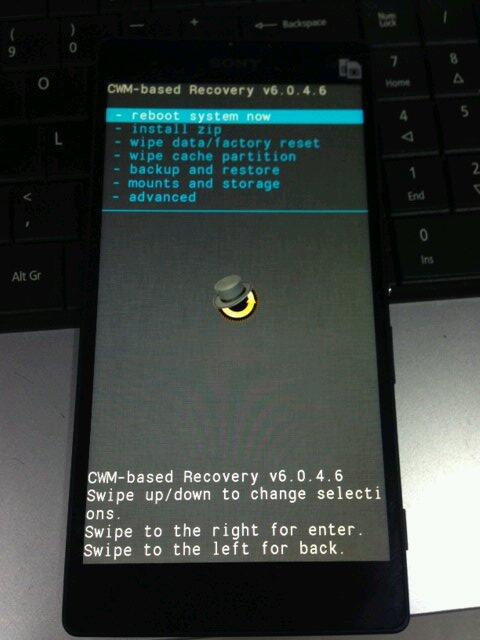
[ credits / special thanks ]
- Koush - for the brilliant work & coding on CWM recovery
- CyanogenMod and FreeXperia Team (especially jerpelea) for too many things *:)
- special thanks to @saiarkar for helping out with testing and risking his devices for the sake of development!!! and NO, his phone was NOT damaged during testing ;)
- ME for creating this for u guys!
[ Requirements ]
- Bootloader unlocked
- working fastboot
- STOCK ROM FW:
- 4.3
- 19.0.D.0.253 - v01
- 4.3
- tested on Dual SIM variant but should work for Single SIM variant too!!
[ features ]
- standard CWM recovery 6.0.4.6 - TOUCH RECOVERY!
- kernel is insecure (ro.secure=0)
- adb debugging is enabled by default in OS
- TIP: if u are experiencing very slow backup in CWM do this
[ WARNING ]
for flashing this kernel you WILL NEED TO UNLOCK BOOTLOADER! Check this thread for more info (same steps as Xperia Z1 are used for Xperia T2 Ultra)
UNLOCKING BOOTLOADER WITHOUT TA BACKUP WILL LEAD TO IRREVERSIBLE LOSS OF DRM KEYS!!!
AND YES CAMERA STILL WORKS AFTER UNLOCKING BOOTLOADER!!!
[ known issues ]
dont know, you tell me!!!
[ how to flash this kernel ] (via fastboot)
- download the kernel image
- save the boot.img to the folder containing fastboot binary
- flash the boot.img using fastboot:
Code:
fastboot flash boot boot.img - reboot from fastboot
Code:
fastboot reboot - the device should now start booting
- enjoy!
[ how to enter recovery ]
when you see the Sony logo and the LED light turns pink/amber/orange keep tapping/pressing VOLUME DOWN key
[ how to Root ]
for instructions on how to root please check this post
[ sources ]
https://github.com/DooMLoRD/android_device_sony_honami
(the current recovery is based on Z1 sources)
[ donations ]
if u feel that this work has helped u OR u think that the work i put into making this is worthy of donations, then click on the following link for buying me some coffee/beer/etc ;)
PAYPAL DONATION LINK
OR
you can buy one of my awesome apps from Play Store!
[ download links ]
PLEASE DO NOT MIRROR, REDISTRIBUTE, REPACK MY FILES
NEW:
Advance Stock Kernel with Recovery v01 (FW: 19.0.D.0.253}
MD5HASH: b6385f648c048859eb1b25670b2be31d
OLD:

enjoy!!!

Aucun commentaire:
Enregistrer un commentaire